
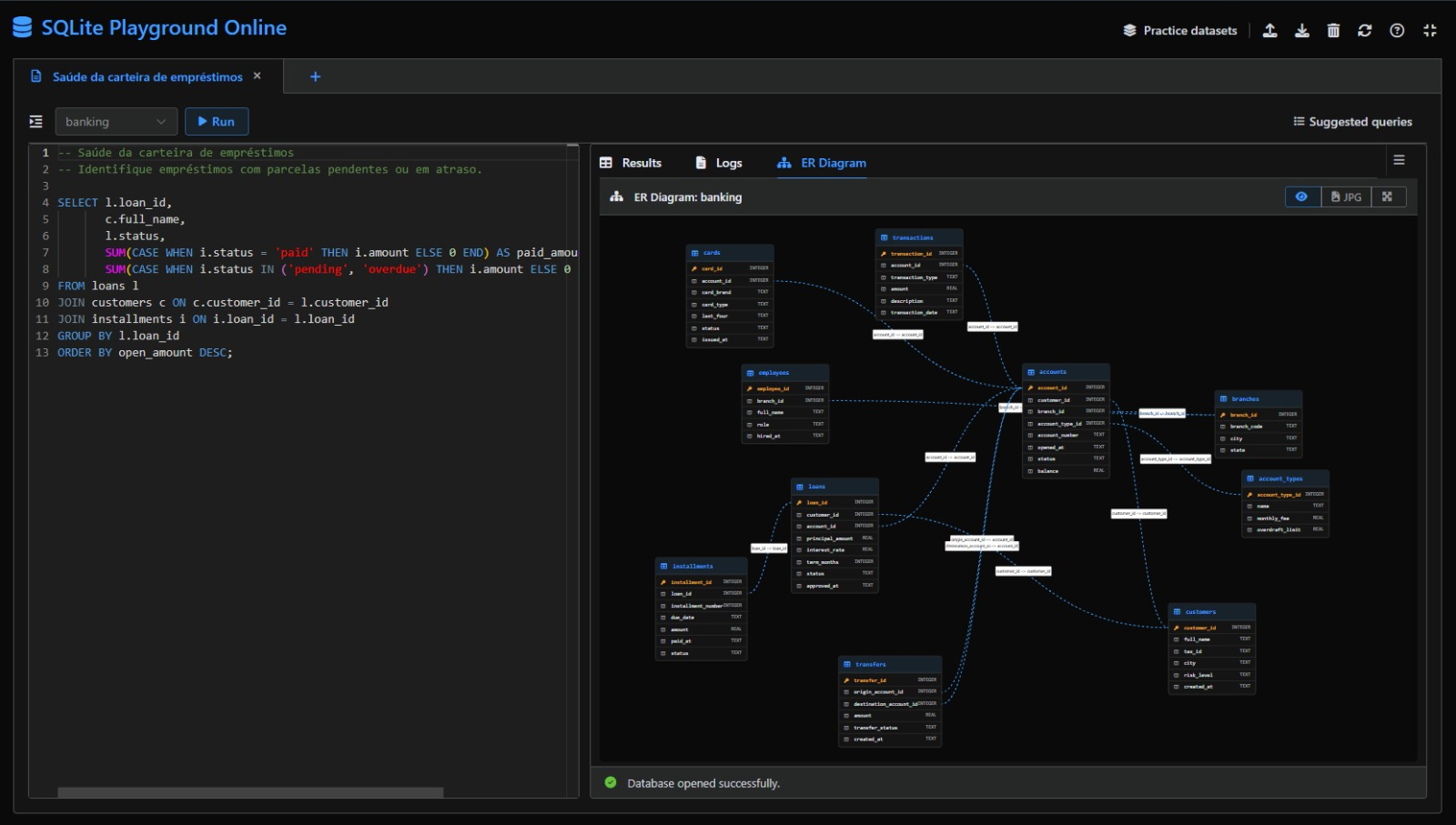
Writing a SQL query is clearer when the database structure is visible. That is why the SQLite Playground on fasttools.dev now includes a side-by-side layout: the code editor stays on the left while results, logs, and the entity-relationship (ER) diagram stay on the right.
It is designed for SQL learners and for professionals who want to reason about tables, keys, and relationships without switching between screens.
What is the side-by-side layout?
In the traditional layout, the editor sits above the result panels. In side-by-side mode, the workspace is split vertically:
- write and run SQL on the left;
- review results, logs, and the ER diagram on the right;
- drag the divider to give more room to the code or the diagram.
The button on the right side of the result-tabs bar switches between the two layouts. Your preferred divider width is saved in the browser.
Why view the diagram while writing SQL?
An ER diagram makes the model behind a query visible. Instead of relying only on memory, you can quickly check which tables exist, the columns in each table, primary and foreign keys, table relationships, and the most sensible path for a JOIN.
That visual reinforcement helps build a mental model of the database. For students, it connects a relationship lesson to a real query. For experienced developers and analysts, it speeds up reading a demonstration schema, planning a query, and validating a data-modeling idea.
A practical JOIN exercise
Open a ready-made scenario such as Banking / Finance and keep the ER Diagram tab open on the right. Then write a query that starts from a main table and follows its relationships.
SELECT
  l.loan_id,
  c.full_name,
  l.status,
  SUM(CASE WHEN i.status = 'paid' THEN i.amount ELSE 0 END) AS paid_amount
FROM loans l
JOIN customers c ON c.customer_id = l.customer_id
JOIN installments i ON i.loan_id = l.loan_id
GROUP BY l.loan_id;
As you read the query, the diagram lets you check the links between loans, customers, and installments. It becomes easier to understand why each JOIN condition exists and how each column relates to the next.
How to switch layouts
- Open SQLite Playground.
- Run or choose a scenario with related tables.
- Open the ER Diagram tab in the result panels.
- Click the layout button on the right of the tabs bar.
- Drag the central divider until the workspace feels comfortable.
On smaller screens, the playground keeps the panels stacked to preserve a usable reading and working area.
A more visual SQL practice bench
SQL is not only about memorizing commands. It is about connecting questions, tables, data, and relationships. Keeping the editor and diagram close together shortens the feedback loop: inspect the schema, form a hypothesis, write the query, and review the result.